Product
Every SKU your vendors sell, searchable at the counter before you ever stock it.
The Rundoo Catalog is a unified, vendor-synced search index of millions of products from the vendors you already buy through. Find a product a customer asks for even if you have never carried it, then pull it into your own inventory in a couple of clicks, with your cost, your price, and your stock.
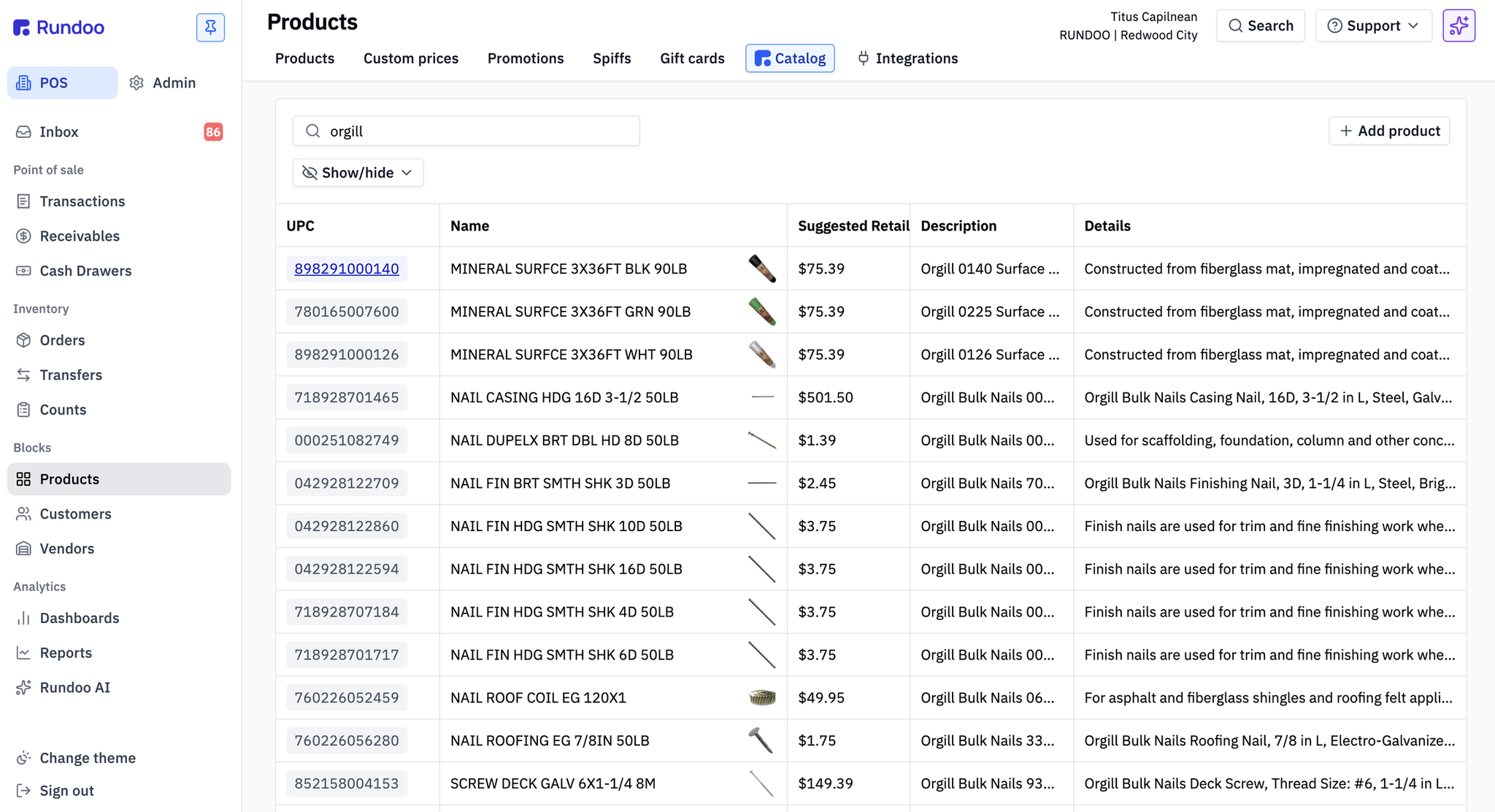
Find any product, then make it yours
Catalog products are findable and your own products are stocked, so you can answer a customer about a SKU you have never carried and then turn that answer into something you can ring up.
One search bar, every vendor's catalog
The catalog pulls directly from the vendors that publish a feed and keeps every SKU in sync, so the full universe of products your vendors sell sits in one searchable index instead of a stack of paper price books.
Search millions of products you have never stocked
Open the catalog and you are looking at the full SKU list from every connected vendor, interleaved into one index. Search runs against UPC and product name at the same time, so a barcode and "regal select" both land the same result, and matches refresh live as you type. When a customer asks about a part you have never carried, you can tell them whether it exists before you promise a thing.
Vendor catalogs that keep themselves current
When Benjamin Moore adds a new color or Orgill drops in a new fence gauge, it shows up in your catalog without you lifting a finger. This is continuous sync rather than a one-time spreadsheet load, so the index stays honest as vendors add products, rename SKUs, and retire the ones nobody buys anymore.
Tell vendors apart at a glance
Every catalog row carries its vendor's brand badge, so you know which vendor a product ships from without opening anything. Search stays vendor-agnostic on purpose, so when two vendors both carry the commodity item you need, you see them side by side and pick on price instead of guessing.
From found to sellable in a couple of clicks
A catalog product lives in the search index with its vendor-published UPC, name, and description, but it will not ring up until you bring it into your inventory, which is the move that turns a catalog entry into a real product with your numbers on it.
Import a catalog product into your inventory
Click any catalog row to open its detail panel, set your cost, price, department, and starting count, and import it. Rundoo creates a first-class product record using the catalog's UPC, name, and vendor as the starting point, so you go from "that SKU exists in the vendor catalog" to "I can ring it up right now" without keying it in from scratch.
Let AI suggest the price
The detail panel includes a Suggest price action, so you are not pulling a margin number out of thin air on a product you have never sold. Rundoo proposes a price you can take as-is or adjust before the product lands in your inventory.
See Rundoo AI →Link, do not duplicate
If you already created a product for an item, link it to the catalog entry instead of importing a second copy, so future vendor updates flow into the record you already priced and stocked. Importing always makes a fresh product and does not auto-dedupe on UPC, so linking is how you keep one clean record per SKU rather than a drawer full of near-twins.
Pull vendor updates into your records
Once a product is linked to the catalog, a Sync to product button pulls the vendor's latest data into your record, and a side-by-side comparison shows your details next to the catalog's. When a vendor refreshes a description, an image, or color-family metadata, you refresh your product with one click instead of retyping it.
The vendors already in the catalog
The Rundoo Catalog cleans and maintains more than a million products and connects directly to the vendors and buying groups independent stores actually order through, and the team builds new vendor catalogs into the platform on a regular basis.
Benjamin Moore, Orgill, All Pro, Emery Jensen, and more
Today's vendor catalogs include the full Benjamin Moore SKU list, the Orgill hardware catalog spanning fence, plumbing, electrical, and lawn and garden, the All Pro paint-sundry and janitorial catalog, and Emery Jensen for Ace-affiliated stores. New catalogs join regularly, so ask sales about timing if yours is not on the list yet.
The data layer behind Benjamin Moore ordering
For paint stores, the catalog is not just search, it is what makes native Benjamin Moore ordering work. Every order line is validated against BM's live SKU list with no guessing at part numbers, live availability and warehouse pricing come through at order time, and BM's own catalog changes keep flowing into the order screen automatically.
See the Benjamin Moore partnership →A vendor not in the catalog yet? Import the products anyway
Vendor catalogs are about continuous sync, so for a vendor that does not publish a feed you can still bring products in from a spreadsheet. Your team keeps selling while the catalog list grows, because a missing feed never has to mean a missing product.
Stores buying smarter on Rundoo






News and updates from the Rundoo team
Titus Capilnean · May 17, 2026
The Rundoo AAA framework: how store owners can use AI to Analyze, Act, and Automate
Six months of leaning into AI-first as Analyze, Act, and Automate, here's what supply store owners are actually building once they stop asking what AI can do and start asking what to hand it next.
Read story
Nick Hershey · April 1, 2026
The #1 Question Stores Have for Us
What actually happens when you switch to Rundoo? We walk through the entire process: your dedicated implementation manager, data migration, hardware, training, and go-live day.
Read story
Nick Hershey · March 1, 2026
How Rundoo Delivers ROI
We analyzed stores that switched to Rundoo and measured what changed: 17% revenue growth, 25% reduction in receivables, and 2% margin improvement.
Read story
Nick Hershey · February 1, 2026
Try AI First
Why Rundoo rebranded to AI-first, and how clients are using Rundoo AI to analyze, act, and automate across their businesses.
Read story
Nick Hershey · January 1, 2026
From Reports to AI: How an AI summary saved this store owner $4,200
How one store owner's 10-minute AI daily summary habit uncovered a $4,200 pricing error hidden in his reports.
Read story
Nick Hershey · December 1, 2025
A Practical Guide to AI for Store Owners
AI is better than ever, but the hype outpaces substance. A practical 3-week guide to using AI in your store.
Read storyFrequently asked questions
What is the difference between a catalog product and one of my products?
Which vendors have catalogs in Rundoo?
Will importing a product create a duplicate?
How does the catalog connect to Benjamin Moore ordering?
My vendor is not in the catalog. Can I still get their products into Rundoo?
See the Rundoo Catalog in your store
Book a demo and we will search the catalog against your vendors, then walk through importing, pricing, and keeping products in sync.